QuotesPilot helps residential contractors turn rough notes into professional quotes, send them fast, and follow up automatically until the client replies.
Capture your notes, let AI structure them, then send a clean quote fast.
Start with phone notes, handwritten notes, or copied field notes.
AI pulls the client, work, quantities, and amounts into a draft quote.
Review, send, and let automated follow-up do the chasing.
Quick mobile preview of the notes-to-quote workflow.
WHAT YOUR CLIENTS RECEIVE
A first impression that closes deals.
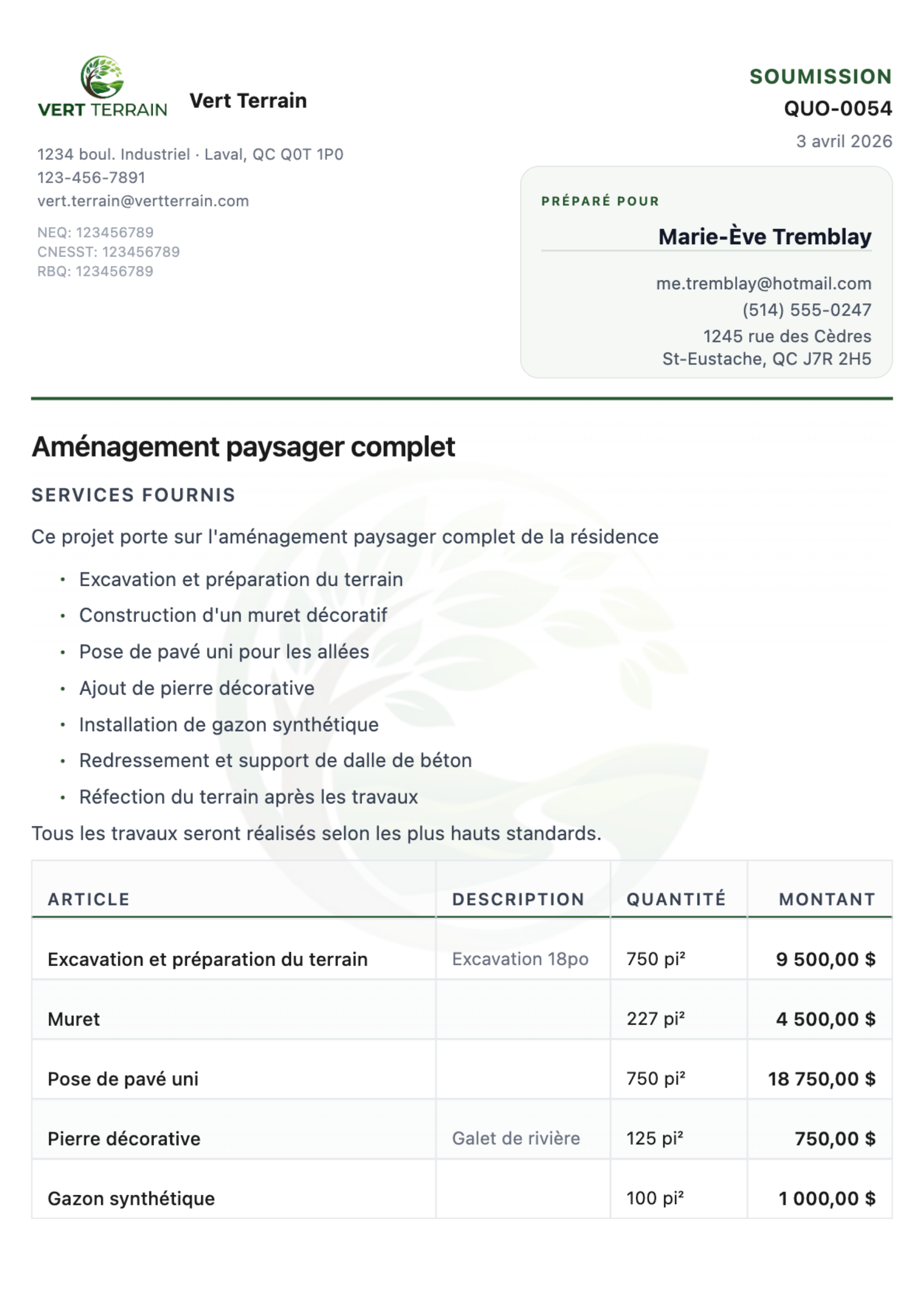
Your name, your logo, your colors. One button to accept. Zero friction for your clients — zero forgotten follow-ups for you.
app.quotespilot.com/soumissions/quo-0054
Accept This Quote
One click to accept — no account needed
Your brand & colorsAutomatic follow-upsOne-click acceptance
Sample quote only — not a real client or project.
41%
Close rate reported by users
100%
Of quotes followed up automatically
3 · 7 · 14
Auto email + SMS follow-ups
1 click
Client signs — no account, no printing
The problem
Unfollowed Quotes Are Lost Revenue.
Most contractors follow up on less than a third of their quotes. The rest just disappear — along with the revenue they could have brought in.
/01
Admin work piles up when you get home.
You leave the job site and the paperwork follows you home. Quotes to write, clients to chase, follow-ups to remember. You spend your evenings on admin instead of resting — or you forget entirely and lose the job to whoever followed up first.
/02
You rebuild every quote from scratch.
No saved prices, no templates. Each estimate means hunting for old numbers, re-typing line items, and formatting everything by hand.
/03
Your tools don't talk to each other.
Estimating in one app, emailing from another, invoicing in QuickBooks. Every handoff is a chance to lose momentum, miss details, or double-enter data.
Built for roofers, landscapers, HVAC techs, general contractors, painters, electricians, and more.
Simple by design
Up and running in 2 minutes
Create the quote first. Sending, QuickBooks sync, and follow-up happen after that, not in separate tools.
01
Start on the job site
Snap a photo of your notes or type them while you're still on-site. AI reads your shorthand and builds the quote from your price list.
02
Build the quote with AI
AI organizes scope, matches line items, and prepares a clean draft quote you can review and edit.
03
Send it your way
Approve and send in seconds. Clients receive the quote by email and SMS — they review, download the PDF, and sign directly from the link. No account required.
04
Follow up automatically
Automated email and SMS reminders go out on your schedule. Both channels, automatically. Reminders stop the moment the quote is won or closed — zero manual follow-up.
05
Convert to Invoice
When the client accepts, convert the quote into a professional invoice in one click. Track status from draft to sent, all in one place.
06
Request Satisfaction + Google Reviews
After a quote is won, send a satisfaction request. Capture private feedback and guide happy clients to your Google review link.
Everything you need
Everything after the site visit gets faster
From rough notes to approved quote to invoicing, QuotesPilot removes the admin drag that slows down your close rate.
Field-ready
Field Notes to Quote
Upload a photo or paste phone notes. AI understands contractor shorthand and turns it into structured quote content.
NEW
One-Click Invoicing
Convert accepted quotes into professional invoices instantly. Track DRAFT → SENT status and sync to QuickBooks automatically.
Accounting-ready
QuickBooks Sync
Import Items from QuickBooks, sync sent quotes as Estimates, and accepted jobs as Invoices.
Reputation booster
Post-Job Satisfaction & Reviews
After a job is won, send a branded satisfaction request by email or SMS. Capture private client feedback and optionally redirect happy clients to your Google review page.
Always on
Built-In Follow-Up
Automatic email and SMS reminders go out on schedule and stop the moment the quote is closed.
Dual-channel
Email + SMS — Both Channels
Send quotes and follow-up reminders by email and SMS. Clients open and sign directly from their phone — no app, no login, no friction.
Client Signs in One Click
Clients land on a branded quote page, review the details, download the PDF, and sign in one tap. No account required. No printing. Works on any phone.
Professional Quote PDFs
Multi-page PDFs with your logo, brand colors, line items, tax breakdown, and optional background image. Looks like you hired a designer.
Email Timeline & Visibility
See every sent initial email and follow-up with full content history directly in quote details.
Price List Builder
Search your catalog, adjust quantities, discounts, and taxes, and save custom items back to your price list.
Team Workflows
Owners, admins, and sellers each get the right access while sharing one company workspace.
Close faster
AI Job Visualization
Turn a site photo into a realistic before/after visual tied to your quote scope. Present it on-site while context is fresh.
Simple pricing
One extra closed job pays for a full year
Everything you need to quote, follow up, and close more jobs — no hidden fees, no long-term contracts.
Early access now open
Help shape QuotesPilot with your ideas
We are in the early access phase and actively listening to contractor feedback to improve every part of the system.
That is why early access users get reduced lifetime pricing: you help shape the product, and we reward that trust.
Early Adopter Price
All Features Included
Start free for 30 days
$14,99/mo
$49/mo
Start with full access for 30 days. If it fits your workflow, your early-access rate stays locked in for life while you stay subscribed.
Full access during the trial. No card charged today.
Three main ways: from field notes (snap a photo or paste phone notes), from a reusable price list, or from an existing file like a PDF, Word doc, or Excel sheet. Most users love the field-notes flow — it turns rough job notes into professional quotes in minutes.
Will my clients know I'm using automation?+
No. Every email goes out under your company name with your branding and logo. Clients see professionally written emails that sound like you wrote them personally.
Can I review quotes before they're sent to clients?+
Absolutely. Choose between Auto-Send mode (quotes go out instantly) or Manual Approval mode (you review, edit, and approve each quote before it reaches the client). You're always in control.
Do I need QuickBooks to use it?+
No. QuickBooks is completely optional. Start with field notes and price-list quoting right away, then connect QuickBooks later when you want estimates, invoices, and item sync.
Does it work for teams and French-speaking clients?+
Yes. QuotesPilot supports owner, admin, and seller roles for multi-user teams and provides full English and French experiences — perfect for Quebec contractors and their clients.
How is this different from Jobber or HouseCall Pro?+
Those are full job management platforms. QuotesPilot focuses specifically on the quote-to-close workflow: creating professional quotes fast, following up automatically, and making it easy for clients to accept. It connects to QuickBooks for accounting rather than replacing your existing tools.
Is my data secure?+
Yes. All data is encrypted in transit and at rest. We use secure magic-link authentication — no passwords to leak or forget — and your quote data is never shared with third parties.
Can I create invoices with QuotesPilot?+
Yes! When a client accepts a quote, you can convert it into a professional invoice in one click. The invoice inherits all line items, taxes, and client details. You can track status from draft to sent and sync invoices to QuickBooks automatically.
Can I collect client satisfaction feedback and Google reviews?+
Yes. After a quote is won, you can manually send a satisfaction request from the dashboard by email and/or SMS. Clients can leave private feedback, and you can optionally include your Google review link to turn positive experiences into public reviews.
Contact us
Questions? We are here to help.
Reach out anytime. Our team is available to answer your questions about setup, pricing, and how QuotesPilot fits your workflow.
Quote the Job. Leave the Driveway. Start Free Today.
Field notes → professional quote → client signs → auto email + SMS follow-ups → invoice. QuotesPilot handles everything after the site visit so your evenings are free. First 30 days free — no credit card.